¶ Sort & Filter
¶ Sort your results
SELECT TOP (N) <column_list>
FROM <table_source>
WHERE <search_condition>
ORDER BY <order list> [ASC|DESC]
--Select all rows
SELECT *

--Select top n number of rows
SELECT TOP (N)

--Select top n percent of rows
SELECT TOP (N) PERCENT

--Select top n rows, return specified columns
SELECT TOP (N) WITH TIES <Column_list1>

--Indicate table to select rows from
FROM <table_source>

--A condition to search
WHERE

--Sort rows ascending/descending before selecting rows
ORDER BY
¶ Page results
SELECT ProductID, ProductName, ListPrice
FROM Production.Product
ORDER BY ListPrice DESC
OFFSET 10 ROWS --Skip 10 rows
FETCH NEXT 10 ROWS ONLY; --Get the next 10
-
OFFSET/FETCH
- An extension of
ORDER BY OFFSETallows you to go to the next page of data by skipping n rowsFETCHwill grab the next n rows
- An extension of
¶ Remove duplicates
SELECT City, CountryRegion
FROM Production.Supplier
ORDER BY CountryRegion, City;

SELECT ALL City, CountryRegion
FROM Production.Supplier
ORDER BY CountryRegion, City;

SELECT DISTINCT City, CountryRegion
FROM Production.Supplier
ORDER BY CountryRegion, City;
- First and second queries are the same since
SELECTinherently hasALLby default DISTINCTwill select only unique combinations of values so that every row is different
¶ Filter with predicates
WHEREuses search conditions which must evaluate to TRUE to return the row- Each condition filters the data and are referred to as Predicates
- Every predicate has a condition that is being tested, usually with operators (=, <>, >, >=, <, <=)
SELECT ProductCategoryID AS Category, ProductName
FROM Production.Product
WHERE ProductCategoryID = 2;
AScreates an alias to “rename” a column/table- Returns rows where ProductCategoryID is equal to 2
SELECT ProductCategoryID AS Category, ProductName
FROM Production.Product
WHERE ProductName IS NOT NULL;
IS NULLorIS NOT NULLto allow/exclude empty values
SELECT ProductCategoryID AS Category, ProductName
FROM Production.Product
WHERE ProductCategoryID = 2
    AND ListPrice < 10.00;
- Multiple conditions can be applied with
WHEREby usingAND/OR ANDis processed beforeOR- Use parentheses to process that first
SELECT ProductCategoryID AS Category, ProductName
FROM Production.Product
WHERE (ProductCategoryID = 2 OR ProductCategoryID = 3)
    AND (ListPrice < 10.00);

SELECT ProductCategoryID AS Category, ProductName
FROM Production.Product
WHERE ProductCategoryID = 2
    OR ProductCategoryID = 3
    OR ProductCategoryID = 4;

SELECT ProductCategoryID AS Category, ProductName
FROM Production.Product
WHERE ProductCategoryID IN (2, 3, 4);
INis a shortcut for multiple equality conditions. Instead of multipleORstatements, just useIN.
SELECT ProductCategoryID AS Category, ProductName
FROM Production.Product
WHERE ListPrice >= 1.00
    AND ListPrice <= 10.00;

SELECT ProductCategoryID AS Category, ProductName
FROM Production.Product
WHERE ListPrice BETWEEN 1.00 AND 10.00;
BETWEENis a shortcut to filter the upper/lower bound. Instead of using two conditions withAND, useBETWEEN.
For date fields:
WHERE ModifiedDate BETWEEN '2012-01-01' AND '2012-12-31';
For time fields:
WHERE ModifiedDate BETWEEN '2012-01-01 00:00:00.000' AND '2012-12-31 23:59:59.999';
SELECT Name, ListPrice
FROM SalesLT.Product
WHERE Name LIKE '%mountain%';
LIKEis only used for characters- Can use wildcard characters and regular expression patterns
- In the example above, this returns all products with names that contain the word ‘mountain’
%is a wildcard to represent any string of 0+ characters_is a wildcard to represent a single character- Read about REGEX to learn more
¶ Combine Tables
¶ Inner join
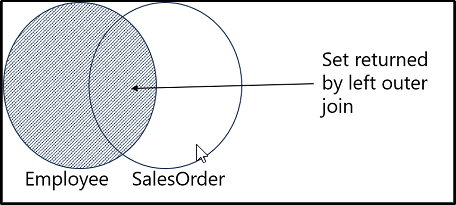
SELECT emp.FirstName, ord.Amount
FROM HR.Employee AS emp
JOIN Sales.SalesOrder AS ord
  ON emp.EmployeeID = ord.EmployeeID;
FROMis done first, thenJOIN, thenONthenSELECT- Joining 2 tables based on the matching EmployeeID columns, then selecting the FirstName column from the first table and the Amount column from the second table
- Can also use
INNER JOINwhich is the default forJOINand is interchangeable INNER JOINfilters out rows that do not meet the conditions- Only rows with matching row in other table is returned
--Join 3 tables together

SELECT od.SalesOrderID, m.Name AS Model, p.Name AS ProductName, od.OrderQty
FROM Production.Product AS p
INNER JOIN Production.ProductModel AS m
    ON p.ProductModelID = m.ProductModelID
INNER JOIN Sales.SalesOrderDetail AS od
    ON p.ProductID = od.ProductID
ORDER BY od.SalesOrderID;
¶ Outer join
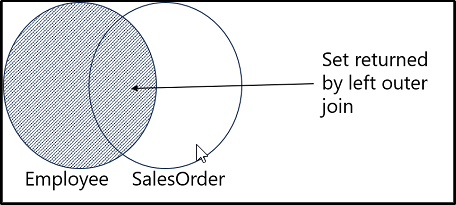
OUTER JOINdisplays rows that match, plus rows that do not match
SELECT emp.FirstName, ord.Amount
FROM HR.Employee AS emp
LEFT OUTER JOIN Sales.SalesOrder AS ord
    ON emp.EmployeeID = ord.EmployeeID;
- Returns row where EmployeeID matches both tables
- Also returns ALL employees
- Any employees with no SalesOrders will return null
- The position of the ON statement is important for what is on the LEFT or RIGHT
¶ Cross join
- Creates result set with all combinations of input rows
--Create all combinations of employees and products

SELECT <select_list>
FROM table1 AS t1
CROSS JOIN table2 AS t2;

SELECT emp.FirstName, prd.Name
FROM HR.Employee AS emp
CROSS JOIN Production.Product AS prd;
¶ Self join
- Compare rows in a single table
SELECT emp.FirstName AS Employee,
       mgr.FirstName AS Manager
FROM HR.Employee AS emp
LEFT OUTER JOIN HR.Employee AS mgr
  ON emp.ManagerID = mgr.EmployeeID;
- Match the MangerID to the EmployeeID and select the name
- Returns the Employee and their manager
¶ Write Subqueries
¶ Understand subqueries
- Subqueries are
SELECTstatements nested within another query - Scalar subqueries return a single value
- Multi-value subqueries return mutliple values, like a single-column table
- Self-contained subqueries can be standalone and run by themselves, then pass the result to the outer query
- Correlated subqueries depend on the outer query by referencing one or more columns from the outer query. They would not function without the outer query.
¶ Scalar or MultiValue
--Scalar (Self-contained)

SELECT SalesOrderID, ProductID, OrderQty,
    (SELECT AVG(OrderQty)
     FROM SalesLT.SalesOrderDetail) AS AvgQty
FROM SalesLT.SalesOrderDetail
WHERE SalesOrderID =
    (SELECT MAX(SalesOrderID)
     FROM SalesLT.SalesOrderHeader);
- Each subquery only returns a single result and is fed to the outer query
- Use parentheses to denote the subquery
--Multi-valued (Self-contained)

SELECT CustomerID, SalesOrderID
FROM Sales.SalesOrderHeader
WHERE CustomerID IN (
    SELECT CustomerID
    FROM Sales.Customer
    WHERE CountryRegion = 'Canada');
- Returns a list of customers in canada, then select the customerID and salesorderID for these customers
- Can also be written using
JOIN, but depends on you. Also, more complex queries can be easier as subqueries instead ofJOINs
¶ Correlated
SELECT SalesOrderID, CustomerID, OrderDate
FROM SalesLT.SalesOrderHeader AS o1
WHERE SalesOrderID =
    (SELECT MAX(SalesOrderID)
     FROM SalesLT.SalesOrderHeader AS o2
     WHERE o2.CustomerID = o1.CustomerID)
ORDER BY CustomerID, OrderDate;
- Uses a correlated subquery to return the most recent order for each customer.
- The subquery refers to the outer query and references its CustomerID value in its
WHEREclause. - For each row in the outer query, the subquery finds the maximum order ID for the customer referenced in that row, and the outer query checks to see if the row it’s looking at is the row with that order ID.
SELECT CustomerID, CompanyName, EmailAddress
FROM Sales.Customer AS c
WHERE EXISTS
(SELECT *
  FROM Sales.SalesOrderHeader AS o
  WHERE o.CustomerID = c.CustomerID);
EXISTSwill check if TRUE but not return any rowsSELECT *is used because we don’t actually care about returning rows- Use
NOT EXISTSas the opposite